Tradie Website Portfolio Pages: How to Show Past Work and Win Better Jobs
On this page 8 sections
Key takeaways
- Use mini case studies, not bare galleries: add context to every project
- Group work by service, suburb or project size to attract the right enquiries
- Use real HTML images with descriptive filenames and alt text for Google indexing
- Pair each project with a testimonial and a clear quote-request action
- Get written permission before publishing addresses or recognisable interiors
- Track enquiries from portfolio pages, not just page traffic
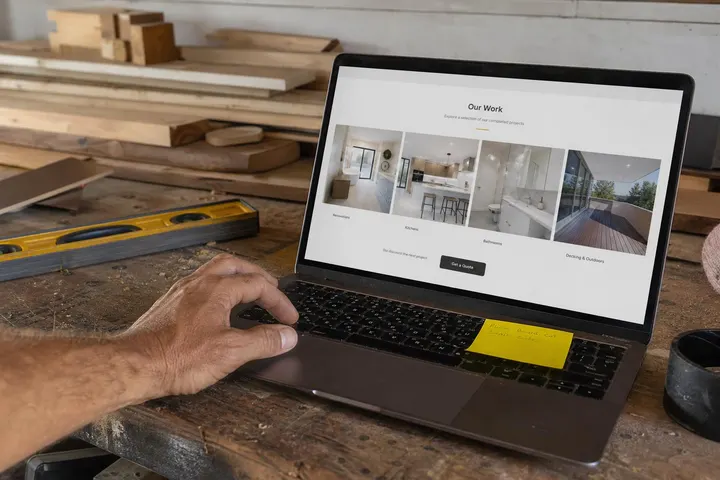
Most tradie website portfolio pages are a wall of photos with no explanation, and they quietly lose jobs because of it. A strong portfolio does more than look nice. It proves you've solved the exact problem a potential customer has, in a suburb near them, at a standard they're willing to pay for. This guide shows you how to build one that wins better work.
Whether you run a building company, a landscaping crew, a joinery workshop or an electrical business, the principles are the same. Your past projects are your best sales tool, but only if they're presented as evidence rather than decoration. If you haven't sorted your photography yet, start with our tradie website photos guide, then come back here to turn those images into proper project pages.
Why Don't Most Tradie Portfolio Pages Win Jobs?
Most portfolio pages fail because they show finished results without explaining the problem, the work involved or why it matters to the next customer.
A gallery of photos is not evidence
Twenty thumbnails of decks or kitchens tell a visitor you've done some work. They don't tell them whether you handled a sloping block, a heritage overlay or a tight budget. Without context, your best job looks the same as a competitor's average one.
What a customer actually wants to see
A homeowner or business manager browsing your portfolio is asking: "Has this business done a job like mine, and did it go well?" They want to recognise their own situation, see a similar finish and feel confident about cost and reliability.
The Project Template That Turns Browsers Into Leads
Every portfolio entry should follow the same short template so visitors can quickly judge whether the job resembles theirs.
The seven elements of a strong project entry
Project title: specific, such as "Bathroom renovation with walk-in shower, Cronulla".
Suburb and property type: suburb level only, never the street address.
The customer's problem: leaking shower, outdated layout, poor drainage.
Scope and methods: what you did, materials used and any compliance work.
Constraints: access issues, strata rules, timeframe or budget.
The result: what changed for the customer.
A testimonial and next step: their words, plus a way to ask for a quote.
Mentioning approximate project size or finish level also helps qualify leads. It quietly discourages poor-fit enquiries and attracts customers who value the same standard of work.
Before-and-after: how to frame it properly
Before-and-after photography is powerful, but only when the shots match. Shoot from the same angle, height and lighting, and add a one-line caption explaining what changed. The same discipline applies to before-and-after posts for tradies on social media.
How long should each project entry be?
Aim for 150 to 400 words plus four to ten images. That's enough to tell the story and give Google relevant text, without burying the photos.
How Should You Organise a Portfolio to Attract Better Jobs?
Organise your portfolio around the jobs you want more of, grouped in the way customers think about their own project.
Group by service type, suburb or project size
Most businesses should group by service first (renovations, extensions, decks), then tag each project with suburb and size. A landscaper might separate "small courtyards" from "full backyard builds" so premium customers find premium examples fast.
Lead with the work you most want more of
If you want more $40,000 jobs and fewer $800 repairs, put your best high-value projects first. Your portfolio shapes the enquiries you get, so feature the work you'd happily repeat.
Using filters and categories on a larger portfolio
Once you pass about 15 projects, add simple filters by service and region. Give each category its own page with a short introduction so it can rank for searches like "deck builder Northern Beaches".
How Do You Make Portfolio Images Work in Google Search?
Portfolio images need to be real HTML image elements with descriptive filenames, useful alt text and fast loading so Google can find, understand and show them.
Use real HTML image elements, not CSS backgrounds
According to Google's official image SEO guidance, important images should use the standard HTML img element. Many template sites load photos as CSS backgrounds, which look fine but may never appear in Google image search. Ask your developer to check.
Descriptive filenames and alt text
Rename "IMG_4821.jpg" to something like "timber-deck-merbau-manly.jpg". Then write alt text describing the image for someone who can't see it: "Merbau timber deck with glass balustrade overlooking a garden." Place images near the text they illustrate.
og:image and primaryImageOfPage for previews
Google's 2026 guidance names og:image and primaryImageOfPage structured data as signals that help it choose a preview image. Set your strongest project photo deliberately for each page. Google's structured data documentation is clear that markup must match visible content, so never mark up details that aren't on the page.
Mobile performance and image formats
Most visitors will view your portfolio on a phone. Export images in WebP format, size them for the screen and use lazy loading below the first image. A page that takes six seconds to load loses people before they see your best work.

Pairing Projects With Trust Signals
Each project should sit alongside proof that customers were happy and that your business is properly licensed and reviewed.
Adding testimonials next to the relevant project
A testimonial from the actual customer, placed on that project page, is far more convincing than a generic reviews page. For more ideas, see our guide to trust signals for tradie websites.
Licences, accreditations and compliance details
List your licence number, relevant certifications and any compliance work (waterproofing certificates, electrical sign-off) where it applies. It answers a question many customers are too polite to ask.
Linking to your Google review profile
Your portfolio shouldn't carry the load alone. A secondary report on the BrightLocal 2026 Local Consumer Review Survey found 97% of consumers read reviews for local businesses. The Uprise Digital 2026 small-business website study of 208 Australian sites found a median of 149 Google reviews, rising to 176 for businesses in the top three local results. Link each project to your Google Business Profile, and keep building reviews by asking customers for Google reviews at handover.
What Permissions Do You Need Before Publishing Project Photos?
Get written permission from the customer before publishing any photos of their property, and remove anything that identifies them or compromises their security.
Getting written permission from customers
Add a simple clause to your quote or job sign-off asking whether you can photograph and publish the work. An email reply saying "yes, happy for you to use the photos" is enough for most small jobs. Keep a record.
What to omit: addresses, people, security details
Street numbers, letterboxes and number plates
People, especially children, without explicit consent
Alarm panels, safes, cameras and gate access points
Personal items, family photos and documents inside homes

Turning Portfolio Visits Into Quote Requests
A portfolio page only earns its keep when it prompts visitors to get in touch and you can measure how often that happens.
CTA placement on individual project pages
Put a short "Want something similar? Request a quote" line after the project story and a click-to-call button on mobile. Pre-filling the enquiry form with the service type removes friction. Our guide to getting more quote requests from your website covers form design in more detail.
Measuring commercial value from your portfolio
Traffic alone tells you little. In Google Analytics, track form submissions, phone clicks and email clicks that start on portfolio pages. Ask every new enquiry which project they looked at, and note which jobs actually convert to paid work. After three months you'll know which entries earn money and which need rewriting.
Conclusion
A good portfolio page is a set of short, honest case studies, not a photo dump. Each project should explain the problem, the work and the result, sit next to a testimonial and licence details, and use properly built images that Google can index and phones can load quickly.
Start small: pick your three best projects of the type you want more of, rewrite them using the seven-element template, get written permission from each customer, and track enquiries for 90 days. If your current site makes this hard, it may be time to look at websites built for tradies that treat your past work as the sales tool it is.
Frequently asked questions
What should I include on my tradie website portfolio page?
How do I make my portfolio photos show up in Google image search?
<img> elements rather than CSS background images. Google's 2026 image guidance confirms that CSS backgrounds may not be indexed. Give each image a descriptive filename (for example kitchen-renovation-newtown-sydney.jpg), add meaningful alt text, and set an og:image for each project page so Google can generate accurate previews.