Medical Website Design: What Patients Need Before They Book

On this page 8 sections
Key takeaways
- Show consultation fees and bulk-billing eligibility near the booking button
- Practitioner profiles with qualifications build trust and reduce pre-booking anxiety
- Online booking should be a primary path, not a hidden afterthought
- Telehealth pages must explain suitability, cost, tech requirements and limits
- Separate routine bookings clearly from after-hours and emergency care
Your medical clinic website is the first clinical impression most patients will form of your practice, often before they hear your voice or walk through the door. If your site doesn't answer the questions patients ask before booking – what you charge, who your practitioners are, whether you bulk bill, how to book quickly – they'll move to the next clinic. The medical clinic web design that converts patients into appointments needs to be clear, trustworthy, accessible and built around the information patients actually need to decide whether to book.
Why your medical clinic website is the first clinical impression
Patients research before they call. The majority don't ring the clinic cold anymore; they visit your website first, check your hours, look for cost information and decide whether online booking is available. If that experience feels incomplete or unclear, they'll bookmark your site but book with a competitor instead. Your website is operating 24 hours a day as your clinic's front desk, triaging questions and moving people toward an appointment or away from it.
Patients research before they call
People spend time on your site looking for specific, practical answers: Does this clinic bulk bill? Can I book a telehealth appointment? What time can I be seen? Can I park nearby? Do I need a referral? They're not reading your mission statement or scrolling through photos of your waiting room. They want friction removed so they can book fast. If those answers aren't visible, you lose the booking.
AI is now part of how patients find health information
According to the Australian Healthcare Index 2026, released on 13 November 2026, 36% of Australians used or encountered AI in healthcare over the past year, mostly to find health information and check symptoms. This matters because AI assistants pull answers from websites that rank well and have clear, authoritative content. If your service pages don't use plain language and structure common questions clearly – "What conditions do you treat?", "How much does a consultation cost?", "Do you offer telehealth?" – they won't appear in those AI-mediated searches. AI search optimisation in Australia means writing for both humans and the algorithms that extract answers from your pages.
The pre-booking information patients expect to find
Patients drop off the booking path when information is missing or hidden, so your website must make four categories of information easy to scan and find near the booking button: services, fees, practitioners and location details.
Services and appointment types
List what your clinic treats and what appointment types are available. Be specific: "General consultation", "Sick visit", "Annual health check", "Injury assessment", "Mental health support" or "Women's health appointment". If some services require a referral and others don't, say so. If you offer telehealth, say which appointment types are suitable for virtual visits. Avoid vague descriptions; patients want to know whether you're the right clinic for their problem before clicking through.
Consultation fees and bulk-billing eligibility
Display your consultation fees clearly, ideally near the booking button. The 2026 Australian Healthcare Index found that 67% of respondents were bulk billed at their most recent GP visit, with affordability cited as a major factor in how people rate their healthcare experience. State whether you bulk bill all patients, some patients, or whether bulk billing is available on a case-by-case basis. List your out-of-pocket cost for uninsured patients or those who don't qualify for bulk billing. If you offer concessions or reduced fees for pensioners or cardholders, publish that information. Patients should not have to call to find out what an appointment will cost; the moment they discover your fee is hidden, they'll check the clinic down the street.
Practitioner profiles and registration
Include the name, qualifications and professional registration (such as AHPRA registration for GPs, allied health practitioners and specialists) for every practitioner patients might see. Link to AHPRA's register if possible, so patients can verify credentials independently. Add a brief bio or practitioner photo if it feels natural to your clinic culture; patients want to know who they're meeting. This is a trust signal that also reassures nervous patients.
Opening hours, location and parking
Make opening hours immediately visible on every page, not just the contact page. Include after-hours and emergency contact information if you provide it, or clearly state what patients should do after hours (call 1800MEDICARE for urgent advice, go to your nearest emergency department, call an ambulance for life-threatening situations). List your address with a postcode, ideally with directions and parking information. Patients researching from their phone need to know they can park nearby and get in quickly.
Making online booking the default, not an afterthought
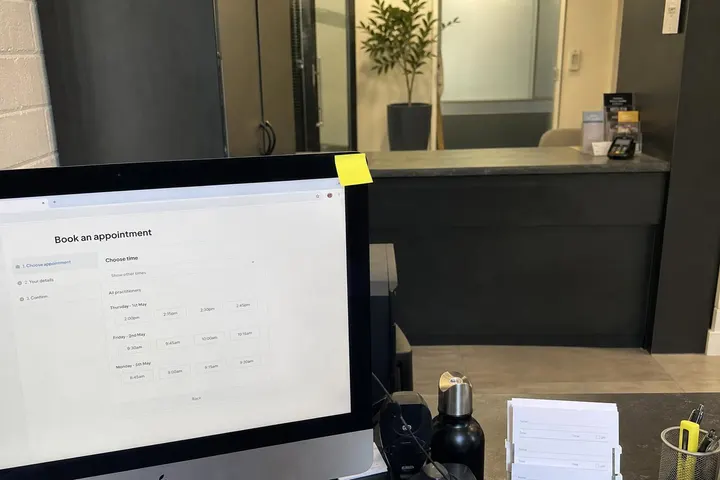
Online booking reduces your clinic's phone workload, speeds up conversion and matches patient expectations; 2026 patients expect to book healthcare online the same way they book haircuts or restaurants. Your website should make booking the easiest path.
Booking button placement and friction
Place a "Book appointment" button above the fold on your homepage, on every service page and near the top of your contact page. Use a colour that contrasts sharply with your background so it stands out. Don't bury booking behind a "Contact us" form or a phone number. The booking button is your conversion highway; every click away from it is a lost booking. Booking page design for health clinics should prioritise speed and minimal form fields. Ask for name, date of birth, contact number, email and appointment type. Save everything else – medical history, insurance details, emergency contact – for the clinic system after they've booked.
Third-party booking platforms vs on-site forms
Many clinics use third-party platforms like Healthengine, which connects more than 10,000 practices and has facilitated more than 108 million healthcare bookings since launch. These platforms handle payment, reminders and integration with your clinic management system, but they add an extra step and may charge per booking. If you embed an on-site booking form, you have full control but must manage integration, payment and reminders yourself. Either approach works; the key is making booking fast and obvious. Avoid making patients choose between booking methods on your site; offer one primary path with a phone fallback for complex cases.
Confirmation and what-to-expect messaging
After booking, send an automated confirmation with the appointment date, time, practitioner name, location, parking information and what to bring (Medicare card, referral, medical history form, payment method). Use this message to manage first-visit anxiety: "Your first appointment will take about 30 minutes. Please arrive 5 to 10 minutes early. Bring your Medicare card and any medical records from other providers." This reduces pre-appointment questions and no-shows.
Telehealth: what your website needs to explain
If your clinic offers telehealth, your website must explain what it is, who it's suitable for, what patients need to access it safely, and when an in-person visit is necessary.
Who telehealth is suitable for
Be clear: telehealth works for follow-up consultations, medication reviews, mental health support, advice and many routine visits, but not for physical examinations, procedures or first visits where diagnosis requires hands-on assessment. AHPRA's updated telehealth guidance for consumers, published 16 November 2026, reinforces that patients should understand what telehealth can and cannot provide. Your website should state this plainly: "Telehealth is suitable for follow-up visits and mental health appointments. Physical examinations require an in-person visit."
Cost, privacy and technology requirements
Tell patients whether a telehealth appointment costs the same as an in-person visit, and whether it's bulk billed. Explain the technology they need: a smartphone, tablet or computer with a camera, microphone and reliable internet connection. Explain privacy: "Your appointment takes place in a secure video call. We recommend a private space. Do not use public WiFi." Link to AHPRA telehealth guidance for consumers (updated November 2026) so patients can read official advice.
When an in-person visit is still required
State clearly when patients must come in person: for physical examination, blood tests, wound assessment, procedures or if the practitioner feels telehealth isn't appropriate. Avoid creating the impression that every appointment can be virtual; that erodes trust when a patient arrives expecting a video call and is turned away.
Trust signals that belong on a medical healthcare website
Trust is non-negotiable in healthcare. Your website needs signals that show patients your clinic is legitimate, registered, transparent and focused on safety rather than sales.
Practitioner registration and qualifications
Display AHPRA registration numbers and qualifications for all practitioners. Link to the AHPRA register. Include relevant certifications, memberships in professional colleges and any specialisations. This is not marketing; it's patient safety.
Transparent ownership and contact details
State the clinic's owner, the business structure (sole trader, partnership, company) and a clear contact number and postal address. Patients want to know who runs the clinic and how to reach them. This transparency builds confidence.
Privacy policy and My Health Record information
Publish a plain-language privacy policy explaining how you collect, store and use patient information. If you use My Health Record — Australian Digital Health Agency services, explain how patients can access their record and what information you share. Patients increasingly expect digital health integration; explaining your approach reassures them.
Governed testimonials and patient reviews
Patient testimonials build trust, but they must be genuine and compliant with AHPRA guidance. Never fabricate reviews or use incentives to generate them. Display real testimonials (with permission), but avoid clinical claims: "Dr Smith is wonderful and caring" is fine; "Dr Smith cured my arthritis" is not. If you have genuine reviews on Google or Healthgrades, link to them so patients can read independent feedback.

Designing for anxious and time-poor patients
Medical patients often feel anxious, rushed or unwell. Your website design should reduce friction and cognitive load.
Plain language and readable typography
Avoid medical jargon unless you define it. Write "high blood pressure" instead of "hypertension", "mental health" instead of "psychosocial wellbeing". Use short paragraphs, bullet points and clear headings. Effective website structure for healthcare means breaking information into scannable chunks so patients find answers without reading long blocks of text.
Mobile-first layouts and accessible contrast
Most clinic website traffic comes from mobile phones. Your site must work smoothly on small screens, with touch-friendly buttons and readable text. Use WCAG accessibility standards: sufficient colour contrast between text and background, resizable text, alt text for images and keyboard navigation. WCAG accessibility for small business isn't optional for healthcare; it's essential. Many patients have vision impairments, hearing loss or mobility challenges; accessible design includes them and improves usability for everyone.
Clear emergency and after-hours instructions
Include a prominent statement on your contact page: "For life-threatening emergencies, call 000. For after-hours urgent care, call 1800MEDICARE or go to your nearest emergency department." Make this impossible to miss. Patients who can't reach you during hours need to know their options without scrolling or guessing.
Creating content that answers questions AI assistants pull from
AI search is changing how patients find health information. Your website must provide structured, up-to-date answers that assistants can extract and quote.
Structured service pages for common patient questions
Create a dedicated page for each service or condition you treat, answering these questions in plain language: "What is this condition?", "What are the symptoms?", "Do I need a referral?", "What will my appointment involve?", "How much does it cost?", "Can I book telehealth?", "What should I bring?" This structure makes your content scannable for humans and extractable for AI systems. Getting found in AI-powered searches means writing for clarity and structure, not keyword density.
Keeping clinical content dated and reviewed
Include a date at the bottom of each clinical page: "Last reviewed by Dr Smith, 15 November 2026". Patients and AI assistants trust dated, recently reviewed content more than evergreen advice. If your information is from 2024, update it or remove it. AI systems penalise outdated health information. Healthcare SEO relies partly on content freshness and accuracy.

Conclusion
A medical clinic website that converts patients into bookings answers practical questions before patients pick up the phone: cost, availability, practitioners, location and how to book fast. It removes anxiety by using plain language, explaining what happens at an appointment and making trustworthiness visible through registration, qualifications and transparent policies. It works seamlessly on mobile phones, loads quickly and places the booking button where it can't be missed.
The 2026 Australian Healthcare Index confirms that affordability, speed and trust are decision-making factors for patients choosing where to book. Your website is working 24 hours a day to either move patients closer to booking or away from it. If you're losing bookings, the first place to look is whether your website answers the four critical questions: what do you charge, who is your practitioner, can I book online, and when can I come in? Fix those four things, and you'll see more bookings from your website.
If your site doesn't have these fundamentals in place, now is the time to build them. Clinic website packages designed for healthcare practices can help you structure your digital front door so it converts rather than frustrates. Your website should earn the first appointment; everything else follows from there.