Marketing Automation for Australian Small Businesses: A Simple Lead-to-Job Workflow
On this page 10 sections
Key takeaways
- One reliable record per enquiry beats a stack of disconnected apps
- Automation handles acknowledgement, tasks and alerts people handle pricing and objections
- Capture marketing consent separately from service enquiry consent at the form
- Email and CRM marketing ranked first for ROI among Australian marketers in 2026
- Track enquiry source, quote rate and won-job rate — not just clicks
Most small businesses don't lose work because their marketing fails. They lose it in the quiet gap between someone filling in a form and anyone actually getting back to them. A simple lead-to-job workflow closes that gap by connecting your forms, alerts, follow-ups and CRM into one reliable system, and it doesn't take an IT department to set up.
This guide maps the whole process from first enquiry to won or lost job. If you've already covered single pieces, such as automating lead notifications for small business, think of this as the wiring diagram that joins them together.
Why do Australian small businesses need a lead-to-job workflow?
A lead-to-job workflow keeps every enquiry moving towards a booked job or a recorded outcome, so nothing slips through the cracks when you're busy.
The gap between enquiry and booked job
Enquiries arrive by web form, email, social messages and phone. Without a system, they land in different inboxes, nobody owns them, and follow-up depends on memory. The cost isn't obvious because you never see the jobs you didn't win.
What the numbers say about automation adoption in Australia
ABS data on AI and technology adoption among Australian businesses, as cited in October 2026 reporting, puts AI use at roughly 11% of small and micro businesses in 2024/25, compared with about 35% of large businesses. Meanwhile, Dotdigital's 2026 Australian marketer survey (500 marketers, May to June 2026) ranked email and CRM marketing first for reported channel ROI at 22%. The takeaway: you don't need advanced AI. A well-organised CRM and consistent follow-up already deliver.
What tools do you actually need to automate the lead-to-job process?
You need five things: a form tool, a CRM (Customer Relationship Management system), a notification method, a calendar or quoting tool, and a simple dashboard.
What you actually need (and what you can skip)
Form: captures details, source and consent.
CRM: holds one record per enquiry with a status.
Notifications: email, SMS or app alerts to the right person.
Calendar or quoting: turns interest into a booking or quote.
Dashboard: shows whether it's working.
Skip chatbots, AI agents and multi-channel nurture campaigns until the basics run smoothly.
Choosing tools that work together without IT help
Pick tools with native integrations, or connect them through a tool like Zapier or Make. The goal is one reliable record per enquiry, not a pile of disconnected apps.
Step-by-Step: Mapping the Lead-to-Job Workflow
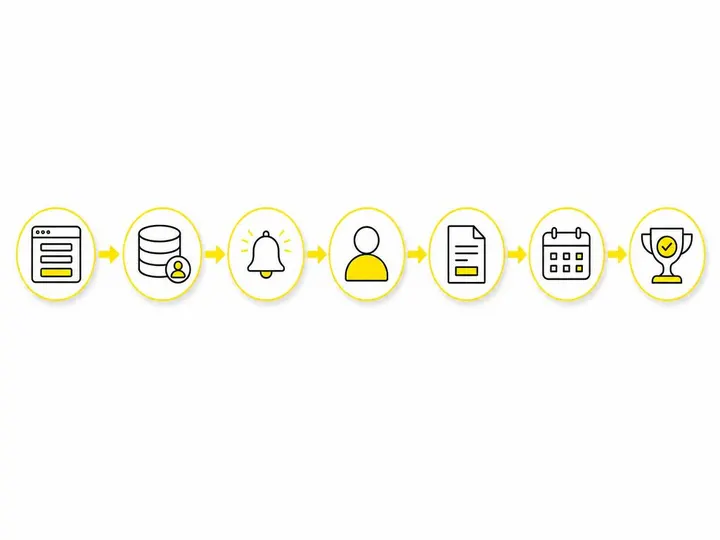
The workflow runs in seven steps, from form submission to a recorded won or lost outcome.
Step 1: Enquiry form captures lead, source and consent
Collect name, contact details, the service needed, how they found you, and separate consent checkboxes (more on that below).
Step 2: CRM creates one record and sends an internal alert
The form creates or updates a single contact, assigns an owner and alerts them instantly.
Step 3: Automated acknowledgement reaches the prospect
A short email or SMS confirms you've received the enquiry and when to expect a reply.
Step 4: A staff member qualifies and responds personally
A real person calls or writes back. Our guide on how to follow up website leads covers what to say.
Step 5: Quote or booking stage and task creation
Moving the lead to "Quoted" or "Booked" creates the next task automatically, such as a reminder to chase the quote in three days.
Step 6: Follow-up sequence for unconverted leads
A short follow-up sequence checks in with quiet leads. See our guide to automating quote follow-ups for timing.
Step 7: Won or lost outcome updates the record and triggers next action
The won/lost pipeline stage stops follow-ups, records the reason, and moves won clients into a review request or repeat-customer list.
Where should automation hand off to a human?
Automation should handle admin and reminders, and a person should take over the moment a conversation, judgement or price is involved.
What to leave to automation
Acknowledgements, record creation, assigning owners, task reminders, overdue lead flags and stopping sequences when status changes.
What must stay human
Qualification, pricing, objections and unusual requests. Tools for AI-assisted lead qualification can help sort enquiries, but the actual conversation should come from you or your team.
How should you capture consent to comply with Australian spam rules?
Use separate enquiry form consent fields for responding to the enquiry and for ongoing marketing, and record exactly when and how each was given.
Separating enquiry consent from marketing consent
Under the Spam Act 2003, a one-off enquiry generally doesn't let you infer consent for unrelated marketing. Use an unticked marketing checkbox with clear wording, and store the timestamp and wording in the CRM. ACMA's guidance on Australia's spam rules and consent obligations says you must be able to prove consent. Website tracking consent is a separate issue, covered in our consent and tracking compliance setup guide.
Unsubscribe, sender ID and record-keeping obligations
Every commercial email or SMS needs accurate sender details and a working unsubscribe. If you send branded SMS, check your SMS sender ID registration: ACMA reports 39,562 sender IDs had been registered by 30 June 2026. Enforcement is real. Latitude Finance paid a $3.96 million penalty after more than 2.7 million Spam Act breaches, including messages without a working unsubscribe.
Why do lead-to-job workflows break down?
Most workflows fail because of messy data, unowned leads or automations nobody switched off, not because the tools are wrong.
Duplicate contacts and unattended inboxes
Match on email and phone to stop duplicates, and never send alerts to an inbox nobody checks.
Missing consent records and unassigned leads
Make consent fields map to the CRM, and set a default owner so no lead sits unassigned.
Follow-up sequences that keep running after a job is won
Nothing looks sloppier than chasing a client who already paid. Tie every sequence to pipeline stage so it stops automatically.
What to Measure: Operational Outcomes Over Vanity Metrics
Measure how enquiries turn into paid work, not clicks or open rates.
The seven numbers worth tracking
Enquiries by source
First-response time
Contact rate
Quote or proposal rate
Won-job rate
Average job value
Lost-lead reasons
Compare before and after setup before crediting automation with growth.
Building a simple dashboard without a data analyst
Most CRMs report these numbers natively. Our guide to building a simple marketing dashboard shows how to lay it out.
Real-World Examples Across Different Business Types
The same seven steps work across almost any small business, with small tweaks.
Professional services firm
An accounting practice routes consultation requests to the right partner, sends an intake checklist and follows up unsigned engagement letters.
Local retailer or product business
A furniture store logs custom order enquiries, books showroom visits and moves buyers to a marketing list only if they ticked the consent box.
Health or education business
A tutoring centre captures trial-lesson requests, books them into the calendar and follows up families who haven't enrolled.
Getting Started Without Overcomplicating It
Start with steps one, two and seven: one form, one CRM record and a won/lost stage. Run that for a month, then add acknowledgements and follow-ups once the basics hold up.
Conclusion
Marketing automation for small business in Australia doesn't need AI agents or expensive platforms. It needs one record per enquiry, clear ownership, a personal reply, consistent follow-up and a recorded outcome, with consent and unsubscribe handling built in from day one.
This week, map how a new enquiry currently moves through your business and note where it stalls. Fix that single point first, then build the rest of the workflow around it.