How Dental Clinics Can Automate Dental Appointment Reminders and Patient Follow-Up
On this page 8 sections
Key takeaways
- Automate three reminder touchpoints: booking confirmation, pre-appointment reminder, and a reply path for cancellations
- Separate recall workflows from treatment follow-up so each message matches the patient's actual next step
- A restrained recall sequence is two to three contacts over about six weeks, then stop
- Waitlist automation can fill cancelled slots faster and may lower no-show rates for filled appointments
- Check data governance before launch: confirm patient data is stored in Australia and opt-outs are logged
Missed dental appointments and lapsed patient recalls cost your clinic real revenue, and manual phone-based follow-up cannot scale. Automated SMS and email workflows paired with marketing automation for small Australian businesses can confirm bookings, remind patients before their appointment, recover cancelled slots through waitlist offers, and re-engage patients who have stopped attending, all while keeping your staff focused on clinical work and genuine patient problems.
Why Missed Appointments and Lapsed Patients Are a Revenue Problem Worth Solving
A clinic loses income every time a patient fails to show up, cancels without rescheduling, or never follows through on a recommended treatment plan. Planet DDS 2026 appointment cancellation and no-show data shows 13.7% of patients cancelled in advance during the first half of 2026, alongside a 7.4% average no-show rate and 15.5% advance cancellations across practices. In Australia, that translates to roughly one in seven bookings either not happening or being cancelled without notice.
What the numbers say about no-shows and cancellations
Academic research backs this up. A University of Michigan study tracking 410,767 dental appointments recorded an 11% failed-appointment rate and 14% patient-cancelled rate. When a 10-slot hygiene day loses one to two patients, that chair sits empty for 60 to 120 minutes. Over a year, those gaps accumulate into thousands of dollars in lost revenue.
The real issue is not that patients deliberately no-show. Life happens: they forget, their work schedule changed, or they lost confidence after deciding to delay a procedure. Automated reminders address forgetfulness, and structured follow-up recovers hesitant patients before they disappear into the "lapsed" category.
Why phone-based recall alone does not scale
Reception staff spend hours each week calling patients who have drifted away or who are overdue for a checkup. Each call takes 3 to 5 minutes, most go to voicemail, and callbacks interrupt clinical time. For a 40-patient recall list, manual phone outreach can consume 3 to 4 hours per week. Automating missed call follow-up and extending that logic to SMS and email means your team sends 40 reminders in minutes, allows patients to reply on their own schedule, and escalates only the conversations that need a human response.
The Three-Stage Dental Appointment Reminder Workflow
A well-designed reminder sequence moves patients from booking confirmation through pre-appointment confirmation to recovery or follow-up, with each stage narrowing the funnel and each message offering a path for the patient to act without picking up a phone.
Stage 1: Booking confirmation sent immediately
As soon as a patient books (online, by phone, or in-clinic), send an automated SMS or email that confirms the date, time, clinic location and what to bring. Include a reply option: "Reply CONFIRM to confirm, RESCHEDULE to change the time, or CANCEL." This catches data-entry errors and gives the patient an immediate sense of control. If your dental booking page design includes online booking, the confirmation can be sent before the patient leaves the site.
Stage 2: Pre-appointment reminder with a reply path
Send a second message 24 hours (or 48 hours for a Monday appointment) before the visit. This should be brief: "Hi Sarah, your cleaning with Emma is tomorrow, Tuesday 15 Oct at 2:00 PM. Reply CONFIRM, RESCHEDULE or CANCEL." Research and BDJ Team overview of AI-assisted recall in dental practice software shows this reduces no-shows significantly because the reminder lands when patients are actively planning their week.
Stage 3: Post-cancellation recovery and waitlist offers
If a patient cancels or fails to show, automated logic can immediately offer an alternative slot: "A cancellation has freed up a spot on Wednesday 16 Oct at 3:30 PM with Emma. Reply YES to book it, or visit [link] to pick another time." This turns a loss into a recovery opportunity without requiring reception to field calls.
Separating Recall Workflows from Treatment Follow-Up
Not all patient outreach is the same, and mixing them under one campaign dilutes the message and confuses patients about why they are being contacted.
Overdue examination and hygiene recall
A patient due for their six-month checkup has a clear trigger: the dentist's recall interval. The message is straightforward: "Hi James, it's time for your 6-month checkup. Book online at [link] or reply BOOK." If no reply within two to three weeks, send one follow-up. After roughly four weeks, stop. This avoids the perception of harassment and respects the patient's autonomy.
Treatment-plan follow-up for undecided patients
A patient who was offered a crown but did not schedule needs a different workflow. Rather than a generic recall, the message might read: "Hi Lisa, we discussed a crown for tooth 36. If you would like to go ahead, reply BOOK or visit [link]. No pressure if you have decided to hold off for now." Lead nurturing principles that apply to patient follow-up emphasize giving the patient choice and stopping when engagement drops, not pushing indefinitely. Send two to three spaced contacts, then pause unless the patient re-engages.
Reactivating lapsed patients without sounding clinical
A patient who last attended 18 months ago should receive a message that feels like a friendly check-in, not a clinical demand. Try: "Hi Marcus, we haven't seen you in a while. If you're ready to come back, we'd love to have you. Book here [link]." Include an opt-out mechanism so the patient can confirm they prefer not to be contacted. After two to three attempts spaced over two to three months, stop unless the patient replies.
Turning Cancellations Into a Waitlist Opportunity
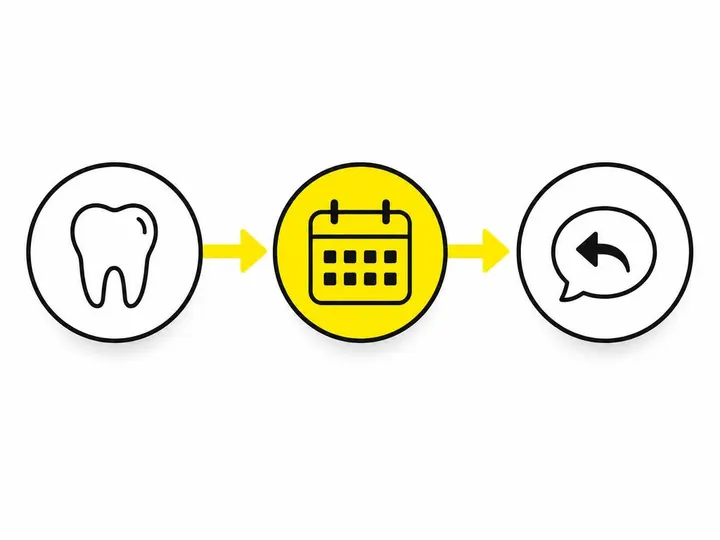
When a patient cancels, the slot is not lost if you can fill it immediately with someone who would otherwise book weeks later or never at all.
How automated waitlist outreach works
Patients opt in to a waitlist by replying to an earlier message or by selecting "interested in earlier appointment" on the booking page. When a cancellation opens a slot, the system automatically sends SMS to the next five to ten suitable patients: "A spot has just opened on Tuesday 15 Oct at 10:00 AM with Dr Sarah. Reply YES to take it, or visit [link]. This offer expires in 2 hours." First person to confirm gets the slot; others see a notification that it was taken. Automating follow-up sequences like this eliminates the gap between cancellation and new booking.
What outcomes to track
Measure the percentage of cancelled slots that are refilled via waitlist within 24 hours, the number of SMS offers needed to fill one slot, and the no-show rate for waitlist-filled appointments versus regular bookings. A 2026 JMIR study reported 3.1% no-show rate for waitlist-filled slots compared with 6.6% across all appointments, suggesting patients who actively accept a cancellation slot are more likely to keep it.
Consent, Privacy and Governance Before You Go Live
Australian dental practices must comply with AHPRA rules, privacy law and best practice before sending any automated message. Skipping this step can breach patient trust and expose the clinic to complaints.
Communication consent and channel preferences
Before the first automated message, verify that the patient has consented to SMS, email or both. Record this in the practice-management system alongside a date. If a patient says "text me only on weekends," document it. Staying compliant with AHPRA rules in patient communications means being transparent about who is sending the message and why. A message should always come from the clinic name, not a generic code, and should include an opt-out instruction: "Reply STOP to unsubscribe."
Data storage, opt-outs and message logging
Confirm whether the automation tool stores patient data inside Australia or overseas. If your software uses a provider outside Australia, clarify data ownership and what happens if you change providers in the future. Every message sent, reply received and opt-out must be logged in the patient record. This creates an audit trail and helps your team see what has already been tried before sending another message.
Staff escalation and stopping rules
Not every message needs human follow-up, but some do. If a patient replies "I cannot afford this right now," that should flag for the dentist, not trigger an automatic second reminder. Set stopping rules: stop recall messages after three attempts; stop treatment follow-up after one cancellation; stop waitlist offers if the patient opts out. Human judgment must override automation when needed.
Choosing and Piloting Automation Tools for Your Clinic
Several practice-management and dedicated automation tools now offer dental-specific workflows. Rather than rolling out to your entire patient base immediately, run a small pilot first.
Features to look for in dental practice software
Seek a tool that integrates directly with your practice-management system (such as Dentally or Planet DDS), allows you to define stopping rules and escalation triggers, keeps patient data on Australian servers or with a clear compliance statement, logs all messages in the patient record, and offers a simple SMS or email reply interface so patients do not need to visit a website. AI-assisted workflow creation can help draft messages, but every message should be reviewed and approved by a staff member before it goes live. Setting up SMS auto-responses requires the same care.
Running a limited pilot before full rollout
Start with 50 to 100 patients in a single workflow, such as overdue recall or treatment follow-up. Run the pilot for two to three weeks, track replies, reschedules, bookings and opt-outs, then review the results with your team. If the no-show rate drops, reply rate is above 10%, and patients report positive feedback, expand to the next 200 patients. If opt-out rates are high or staff report confusion, adjust the message wording and try again.

What to Measure: Outcomes Over Delivery Stats
Avoid measuring only how many messages were delivered. Instead, track the metrics that show business impact: percentage of reminders that result in a confirmed appointment, number of cancellations recovered via waitlist, treatment-plan bookings generated from follow-up, recall bookings generated from reminder, opt-out rate and unresolved replies (messages that need manual follow-up). Over time, compare the no-show rate before and after automation within the same workflow to see the real effect.
Conclusion
Automated dental appointment reminders and patient follow-up reduce no-shows, recover cancelled slots and re-engage lapsed patients without requiring your reception team to spend hours on the phone. The key is building separate workflows for recall, treatment follow-up and waitlist recovery, respecting patient consent and preferences, and stopping outreach when engagement drops. Before you launch, verify data governance, record consent, and run a small pilot to prove the approach works for your clinic.
The commercial return is straightforward: every missed appointment you prevent or every cancelled slot you fill through automation is revenue your clinic would otherwise lose. Start with one workflow, measure the outcomes that matter to your business, and expand once you see the proof.