How to Use AI Quoting Software for Tradies to Turn Enquiries into Estimates Faster
On this page 7 sections
Key takeaways
- Manual quoting costs tradies 5 to 15 hours per week in admin time
- A 3 to 7 day quote lag significantly reduces your conversion rate
- AI tools can draft a structured estimate from raw enquiry details in minutes
- The best results come from pairing AI drafts with your own final review
- Faster quotes win more jobs without needing more leads
Most tradies spend 5 to 15 hours a week chasing quote details, writing estimates by hand, and then waiting days for replies. By the time a quote lands in front of a client, you've already lost momentum, and half the time they've gone to someone else. AI quoting software cuts that friction by pulling together messy enquiry data, drafting an estimate in minutes, and feeding it straight into your follow-up workflow. But only if you set it up right.
Why Quoting Is One of the Biggest Time Drains for Tradies
Every tradie knows the pattern: a customer rings, leaves a voicemail with half the details. An email comes through with a photo and a vague description. A text message arrives with a budget figure that might not even be serious. Meanwhile, you're out on a job, you've got three other quote requests sitting in your inbox, and nobody's written anything down in a way that makes sense when you finally get back to the office.
The real cost of a slow or lost quote is not just the hour you spend chasing information. It's the job itself. Industry data shows a lag of 3 to 7 days between inquiry and quote delivery tanks conversion rates hard. Clients get impatient, ring competitors, and by the time your estimate lands, they're already comparing three other options. Add in the fact that you probably have to ring back to clarify scope, materials, or site access, and you've now spent two hours on a job you haven't won yet.
The real cost of a slow or lost quote
Each lost or delayed quote costs an average of $300 to $800 in lost revenue per inquiry. If you're handling 5 to 10 quote requests a week and losing even one to a faster competitor, you're bleeding $1,500 to $4,000 a month just from slow turnaround. Across a year, that's $18,000 to $48,000 in revenue you never even chased properly.
Where enquiry data goes wrong before you even start estimating
The enquiry data problem is the root cause. Your website form captures name and phone number. A customer rings and leaves half the job details in a voicemail. They send a photo via WhatsApp. A mate mentions it at the pub. Now you've got scattered notes in three places, you're not sure if that $5,000 budget is real, and you've got to ring back to ask questions you should have asked the first time. About 20 to 30 percent of estimates need revision because the initial brief was incomplete or contradictory. That's rework, frustration, and lost time.
What AI Quoting Software Actually Does (Plain English)
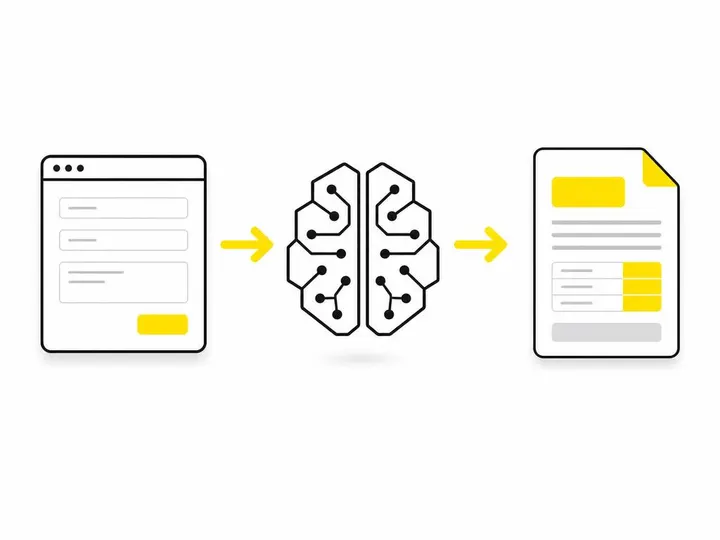
AI quoting software takes a messy enquiry whether it's a contact form submission, an email, or notes you paste in and converts it into a structured job brief, then uses your own rates and pricing logic to draft an estimate that a human still needs to review and approve before sending.
This is not magic, and it's not a replacement for your judgment. It's automation of the admin and calculation parts so you can focus on the parts that actually matter: checking the scope is right and the numbers make sense.
Organising scattered enquiry details into a usable job brief
An AI quoting tool reads a raw enquiry and extracts key details: job type, location, materials, scope, timeline. It fills in a structured form, what's called a job brief or scope of works so you have a clean, standardised snapshot of what the customer is actually asking for. Instead of rereading a five-paragraph email and guessing, you see: "Bathroom reno, Petersham, tiling, plumbing, electrical, four weeks, budget $12,000, site visit done." That's your starting point, and it took two seconds to generate.
Drafting a price estimate based on your rates and scope
Once you've set up your labour rates, material costs, and markup rules in the system, the AI applies them to the job brief and generates a draft estimate. If the job is 20 hours of labour at $75/hour, plus $2,000 in materials, plus 25 percent markup, the system calculates it and presents a line-by-line quote. You review it, adjust if needed, and send. That calculation and formatting, which might have taken you 30 to 45 minutes by hand, now takes seconds.
What it does not do and why your review still matters
AI does not understand the site. It does not know if there's asbestos, bad soil, or hidden complications. It does not account for weather delays or tricky access. It does not replace your site visit or your experience. What it does is handle the paperwork, so when you get back from the site or after you've talked to the customer, you can spend your time making a smart decision about scope and price, not retyping a quote from scratch. You still review every estimate before it goes out. If the scope is wrong, you change it. If the price is out of line, you adjust it. That human sanity check is not optional.
How to Set Up an AI Quoting Workflow for Your Trade Business
Setting up a working AI quoting workflow requires five key steps, and they all matter. Skip one, and the system breaks down.
Step 1: Tighten up your website enquiry form first
Your enquiry form is the front door. If it's loose, everything downstream is garbage. Make sure the right contact form fields for tradie websites include: job type, location, scope (what work needs doing), timeline, budget (if relevant), and a way for customers to upload a photo or brief description. The cleaner the input, the better the AI output. A vague "tell us about your project" field will give you vague results.
Step 2: Route enquiries into one inbox or CRM
Email, phone, website form submissions, and social media messages all need to land in the same place. Most tradies use a CRM for tradies in Australia to consolidate enquiries. Platforms like ServiceTitan, Buildxact, Fergus, and Tradify do this natively. If you're not ready to commit to a full CRM, tools like Zapier can route enquiries from your website form into a single email or spreadsheet so nothing falls through the cracks.
Step 3: Use an AI tool to parse and structure the job details
Once an enquiry lands in your inbox or CRM, an AI quoting tool reads it and extracts the key facts into a structured brief. Some trade-specific platforms like Buildxact estimating and quoting platform or Tradify job management software for Australian tradies have this built in. Alternatively, you can use ChatGPT or GPT-4 with a simple prompt: paste the enquiry, ask it to extract job type, location, scope, and budget, and it will spit out a clean brief in seconds. For more complex setups, using AI to handle tradie enquiries can do the whole first pass without human intervention.
Step 4: Generate and review the estimate draft
Feed the structured brief and your rates into the quoting tool. It generates a line-by-line estimate. You check it: Is the scope right? Are the labour hours realistic? Is the material cost in line with suppliers? Are there site complications you need to factor in? Once you're happy, you approve it for sending. This step is where your experience and judgment stay in control.
Step 5: Send and follow up without the manual chase
Most quoting platforms now have integration with automate your quote follow-up tools. Once the estimate is sent, a reminder is automatically scheduled to follow up if the customer hasn't replied in 3 to 5 days. This closes the biggest leak in the quoting funnel: quotes that sit unanswered because nobody remembered to chase them.
Which AI Tools Are Worth Looking At in 2027
In 2027, you've got two categories of tools to choose from: purpose-built trade quoting platforms and general AI tools adapted to quoting workflows.
Purpose-built trade quoting platforms
Fergus trade business management software, Buildxact, Tradify, and ServiceTitan all have AI or automation-assisted quoting built in. They know tradies' workflows because they were built for them. The downside: they're not cheap, often running $50 to $200 per month, and they come with features you might not need yet. The upside: integration with scheduling, invoicing, and job tracking is seamless, and you get customer support that speaks your language.
General AI tools adapted for quoting workflows
ChatGPT, GPT-4, and Zapier are free or low-cost ($20/month) and can do 80 percent of the work if you're disciplined about setting up templates and prompts. You paste an enquiry, ask ChatGPT to extract details and generate an estimate, and copy the result into your proposal software. It's more manual, but it costs almost nothing to start.
What to check before committing to any platform
Before you sign up, ask: Does it integrate with my existing CRM or invoicing software? Can I set my own rates and markup rules? Is there a phone number support option, not just email? Will it let me generate recurring quote templates for common jobs? And what's the actual cost when you add up all the add-ons? A platform that looks cheap at $50/month might be $150/month once you add users and integrations.
Common Mistakes Tradies Make When Adopting AI Quoting
Three mistakes kill most tradie attempts at AI quoting.
Using AI output without a final sanity check
The worst tradie is the one who generates an estimate on Tuesday and sends it on Thursday without reading it. AI makes mistakes. It might misread scope, double-count labour, or miss a critical detail from the original enquiry. You have to read every estimate before it goes out. If you're not going to do that, AI quoting will cost you more than it saves.
Skipping the enquiry form improvements
If your website form only asks for a name and phone number, AI quoting software is working with one hand tied behind its back. Spend a day fixing getting more quote requests from your website by improving your form. The quality of your input determines the quality of your output. Every time.
Expecting AI to replace the site visit on complex jobs
AI is great for straightforward jobs: a kitchen cabinet repaint, a fence repair, a door replacement. For a $50,000 renovation, a structural issue, or anything with unknowns, you still need to visit the site and talk to the customer face to face. AI quoting is a speed tool for routine jobs, not a magic wand for every estimate you write.
What to Expect: Time Savings and Realistic Outcomes
How much time can you realistically save
If you're currently spending 45 minutes per estimate on data entry, research, and calculation, AI quoting cuts that to 10 to 15 minutes (data review and approval only). Across 5 quotes a week, that's 2.5 to 3 hours saved per week, or roughly 130 to 150 hours per year. For a tradie earning $75/hour, that's $10,000 to $11,000 per year in recovered time. But the real value is not the saved hours; it's the faster turnaround. Quotes that land in the client's inbox within 24 hours instead of 5 days will convert at a higher rate.
Impact on conversion rates and revenue
A faster quote cycle typically lifts conversion rate by 10 to 20 percent. If you currently win 4 out of 10 quotes (40 percent conversion), and AI quoting lifts you to 5 out of 10 (50 percent), and your average job is worth $3,000, that's an extra $3,000 per 10 enquiries. Over a year with 200 enquiries, that's $60,000 in additional revenue from the same marketing spend, just from quoting faster and following up smarter. Following up on enquiries effectively is often where the biggest gains hide, and AI quoting tools integrate that follow-up into your workflow automatically.

Conclusion
AI quoting software is not a replacement for your expertise or your site visits. It's a tool that removes the admin burden from quoting so you can focus on the parts that actually matter: understanding the customer's needs, checking the scope is right, and making sure your price is fair. Set up a clean enquiry form, route all your inquiries into one place, use an AI tool to structure the brief and draft the estimate, review it carefully, and then follow up automatically. The result is faster turnaround, higher conversion rates, and real money back in your pocket.
Start with one platform that fits your budget and workflow. You don't need the most expensive option to see the benefit. Even a free ChatGPT prompt and a structured email template will cut your quoting time by a third. The key is consistency: use the same tool every time, build the habit, and let the system do the work. Within a month, you'll see the difference in your enquiry-to-job pipeline.