How to Qualify Leads for Tradies: Stop Wasting Time on Bad Enquiries

On this page 7 sections
Key takeaways
- Add a postcode or suburb field to reject out-of-area enquiries instantly
- Ask for budget range upfront so low-budget jobs self-select out
- A timeline question separates ready-to-book jobs from early browsers
- Job-type dropdowns stop the wrong trade getting the wrong enquiry
- Auto-reply messages can set expectations and warm leads before you call
Most tradies waste weeks chasing leads that will never convert. They ring unqualified prospects from the wrong suburbs, follow up with customers who can't afford their rates, and spend time on jobs that fall outside their specialty. The fix isn't a better ad campaign it's a qualifying form that filters bad leads before they land in your inbox.
Why most tradie websites send you the wrong leads
A generic website contact form treats every enquiry the same way. Someone rings or fills in a web form, and your phone buzzes. You assume they're a real job. Often they're not. They live two hours away. They've got a budget of five hundred dollars for a ten-thousand-dollar job. Or they're just comparing quotes and have no intention of booking anyone this year.
The cost of chasing unqualified leads adds up fast. You burn fuel, lose time, and damage your close rate when prospects aren't ready or can't afford you. A local lead generation strategy for Australian tradies only works if the leads you're generating actually fit your business. That's where qualification starts.
The four lead-quality killers
Most tradie leads fail for one of four reasons. They're outside your service area (wrong postcode or too far to travel). They've got no budget for the work you do. They're not ready to move forward (just researching in six months' time). Or the job type doesn't match what you specialise in. A qualifying form catches all four before you waste a call.
Volume is not the same as value
Twenty unqualified leads are worthless. Five qualified leads that match your service area, budget, timeline, and specialty will close faster and pay better. Most tradie websites prioritise volume—get as many enquiries as possible—and ignore quality. It's backwards. You need leads that can actually say yes.
The four qualifying questions every tradie form needs
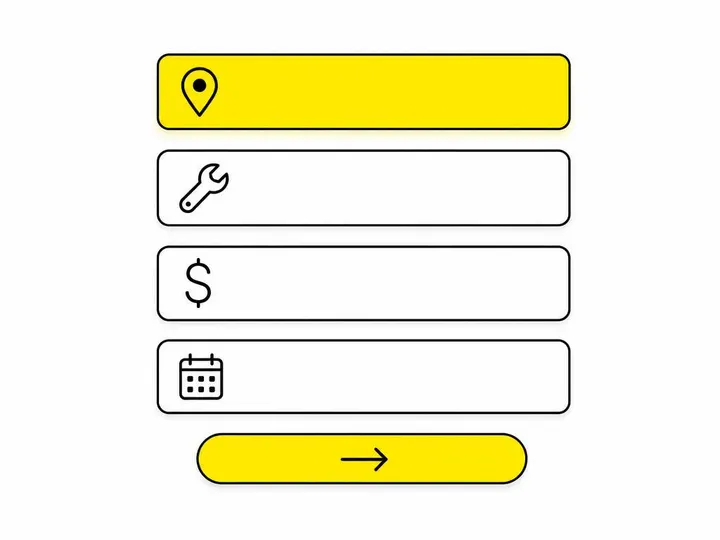
A short, focused form with the right four questions will filter out 60 to 70 percent of time-wasting enquiries before they reach you.
1. Service area—postcode or suburb
Ask where the job is located, not where the customer lives. Use a dropdown list of suburbs or postcodes you actually service. If someone picks a postcode outside your area, your form can auto-reply with a referral or polite redirect. This single question stops the biggest waste: driving to jobs outside your zone.
2. Job type—dropdown, not a blank text box
Offer a dropdown menu of the services you provide: plumbing repairs, tap installation, blocked drains, or whatever fits your trade. Don't use a text box where customers type whatever they want. A text box gets messy, and you'll still chase jobs you don't do. A dropdown makes sure the job matches your expertise before the lead reaches you.
3. Budget range—awkward but worth it
Most tradies avoid asking about budget because it feels uncomfortable. It's not. A customer who thinks a full kitchen renovation costs two thousand dollars isn't a real lead for that job. Ask them to select a budget range: under five hundred dollars, five hundred to two thousand, two thousand to five thousand, or five thousand plus. This single question saves you ten phone calls a month with people who can't afford you.
4. Timeline—when do you need this done?
Ask whether the job is urgent (this week or next), soon (within two months), or planned (three to six months). Urgent and soon jobs convert faster. Planned jobs are often research-only. Your follow-up strategy changes based on this answer, so capture it upfront.
How to build a qualifying form without scaring off good leads
Long forms kill conversions. Keep your qualifying form short enough that a customer fills it in without frustration, but smart enough to filter bad leads.
Keep the form short and in plain language
Four to five fields, maximum. Use plain English—don't say "geographic footprint"; say "Where is the job?" Ask only what you actually need to know. Every extra field drops your completion rate by 5 to 10 percent. Your form is not a survey.
Make budget and timeline optional but visible
If budget or timeline feels too forward, mark those fields optional on the form. But show them anyway. Many customers will fill them in because they're thinking about it. Those who skip them still submit the form, and you can ring them back and ask. Optional doesn't mean invisible—it just means you don't block the submission if they leave it blank.
Use conditional logic to show or hide fields
Conditional logic (also called form field logic) shows or hides questions based on previous answers. If a customer selects "guttering repairs," you might auto-show a question about roof height. If they pick an out-of-area postcode, the form can immediately offer a referral or alternative next step instead of forcing them to fill in the rest. This keeps the form lean and makes the experience feel personal, not automated.
What to do with leads that do not qualify
Not every enquiry is a lost opportunity. Some are misdirected or premature. Handle them well and they'll refer you later or come back when they're ready.
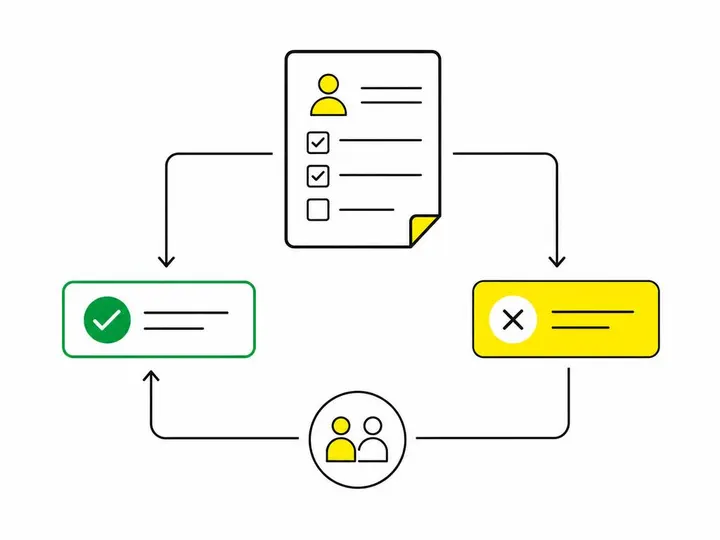
Redirect them politely with an auto-reply
When a lead doesn't qualify, send an immediate auto-reply or SMS thanking them and explaining why you can't help right now. Don't ghost them. A customer who lives outside your zone might tell a mate who does live in your service area. Be professional. A brief auto-reply message saves you the awkward phone call and builds goodwill.
Refer out-of-area leads to a trusted trade partner
If someone's job is outside your zone, offer to refer them to another tradie you trust nearby. Build a short list of referral partners in other suburbs or regions. When an out-of-area lead submits, your auto-reply includes a referral. That customer feels helped, and you may get referrals back over time.
How fast you respond still matters, even with a qualifying form
A qualifying form filters bad leads, but speed still wins. Even the best form won't close a lead if you take three days to ring them back.
The five-minute rule for tradie leads
The five-minute rule means contacting a lead within five minutes of submission. Research on lead response times shows that leads contacted within five minutes are five times more likely to convert than those contacted after thirty minutes. For tradies, this is real. A customer who just submitted a form is thinking about the job. Ring them before they've moved on to your competitor's website.
Using an AI chatbot or auto-SMS to bridge the gap
You can't always answer within five minutes. An AI chatbot for Australian small business websites can greet the customer instantly, confirm their details, and set expectations for your follow-up. Or send an automated SMS the moment they submit: "Thanks for enquiring. We'll call you within one hour." That message costs pennies, builds trust, and lets you hit the five-minute rule without being glued to your phone. Tools like automating lead responses for small business handle this without extra work on your end.

Putting it all together: a qualifying workflow for your tradie website
Here's how to set up a lead qualification system that actually works.
Step-by-step setup checklist
Add a four to five field form to your website homepage and relevant service pages (suburbs served, job type, budget range, timeline, name and phone).
Set up conditional logic so out-of-area postcodes trigger a referral message instead of a full form submit.
Create an auto-reply email and SMS template for qualified leads (acknowledge receipt, confirm next steps, set expectations for your call).
Create a separate auto-reply template for unqualified leads (thank them, explain why you can't help, offer a referral if relevant).
Set a phone reminder or calendar alert to call qualified leads within five minutes of submission (or use a chatbot to send an immediate message while you're on your way).
Integrate your form with your CRM or spreadsheet so every lead is logged and tracked.
Test the form yourself on mobile and desktop before going live.
Metrics to watch after you launch
After your form is live, track these numbers to see if it's working. Form completion rate should sit between 50 to 80 percent, if it's lower, your form is too long or unclear. Qualification rate (the percentage of submitted leads that actually match your criteria) tells you whether your form is filtering well. Close rate should improve because you're only chasing qualified leads. Response time is your own metric—aim for five minutes or less on at least 80 percent of qualified leads. Finally, watch your referral rate for out-of-area leads. If you're sending referrals consistently and professionally, some of those customers will recommend you to someone in your zone.
A well-built qualifying form isn't a sales barrier. It's a time saver. When done right, it improves the customer experience too. Customers appreciate being asked the right questions upfront instead of receiving a vague call-back two days later asking where they are and what they can spend.
If you're still using a generic contact form that treats every enquiry the same, your conversion rate is lower than it should be. Fix the form, and you'll spend less time on the phone chasing dead leads and more time closing real jobs. Turning website visitors into quote requests starts with asking the right questions at the right moment.
Conclusion
Qualifying leads is not about turning customers away, it's about making sure the leads you chase are worth your time. A four-field form that asks for service area, job type, budget, and timeline will filter out 60 to 70 percent of time-wasting enquiries and leave you with leads that can actually convert. Add conditional logic to auto-redirect out-of-area or unsuitable jobs, set up auto-replies for both qualified and unqualified leads, and commit to the five-minute response rule.
The tradie websites that win are not the ones with the most form submissions. They're the ones with the fewest, but highest-quality, leads and the fastest response times. Start with a short, focused qualifying form on your homepage and service pages, measure your completion rate and close rate, and adjust based on what your numbers tell you. Quality beats volume, every time.