Mobile-Friendly Website Design for Australian Small Businesses: What Actually Matters in 2026
On this page 8 sections
Key takeaways
- Most Australian local searches happen on mobile, not desktop
- Slow load times kill conversions before visitors even read your page
- Click-to-call buttons are the single highest-impact mobile feature for tradies
- Short, single-column forms dramatically reduce drop-off on phones
- Google ranks mobile experience first, so it directly affects local SEO
Most Australian small business owners think their website works fine on mobile because it doesn't look completely broken when they glance at it on their phone. The reality is harsher: if your site isn't deliberately built around how people actually use phones, you're losing leads to competitors who did the work.
Why Mobile Usability Matters More Than Ever for Australian Small Businesses
Google Mobile-First Indexing means the search engine crawls and ranks your site based on how it performs on mobile, not desktop. If your mobile experience is clunky, your local rankings suffer, and local customers never find you. For service businesses and tradies, this is genuinely critical because most of your leads come from people searching "plumber near me" or "electrician [suburb]" on their phone while they're dealing with a problem right now.
How local customers actually find tradespeople and service businesses
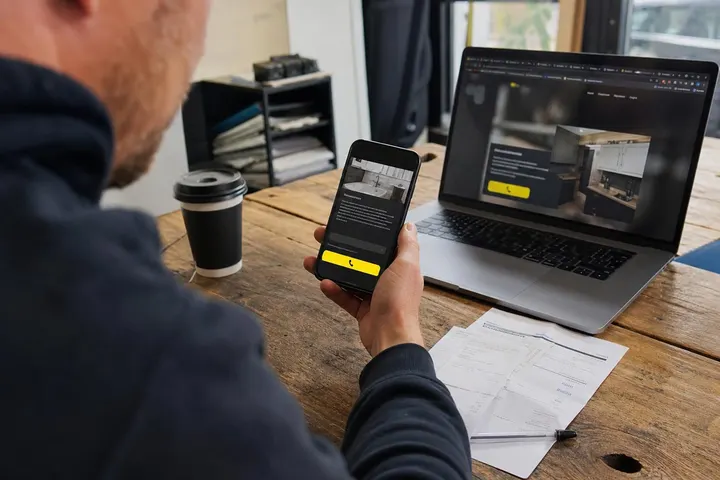
A blocked drain at 10 p.m. or a roof leak on a weekend doesn't wait for someone to sit down at a laptop. Your potential customers are standing in their kitchen or looking up at water damage, searching on their phone. They want to see your business name, phone number, reviews, and availability within three to five seconds. If your site takes eight seconds to load or the phone number is buried under clunky navigation, they tap the next result. That's a lost lead, full stop.
The best tradie websites make it trivially easy to call, text, or ask for a quote from a phone. We've covered what to put on your tradie homepage in detail, but on mobile, simplicity wins every single time.
The link between mobile experience and Google local rankings
Google's Mobile-First Indexing directly affects how your site shows up in local search results and the Google Local Services ads that appear at the top of search pages. Core Web Vitals, which measure page speed and responsiveness, are part of Google's ranking factors. A slow mobile site signals poor user experience, and Google penalises it. If your competitors have faster mobile sites, they'll rank above you for "electrician Sydney" even if your business is equally good.
You can check your mobile performance right now using Google PageSpeed Insights, which shows your Core Web Vitals score and tells you exactly what's dragging your site down on phones.
Page Speed: The First Thing Visitors Judge (Even If They Don't Know It)
Page speed on mobile is the single biggest reason visitors bounce before they even see your quote request form or phone number. If a page takes longer than three seconds to load on a typical 4G connection, most people have already hit back and called a competitor.
What slows down most small business websites on mobile
Oversized images are the number one culprit. A beautiful 8 MB photo of your finished deck project looks crisp on desktop, but it'll take 15 to 20 seconds to load on mobile data. Unoptimised WordPress plugins, auto-playing videos, embedded third-party scripts, and poor server hosting add up quickly. Many small business websites run on cheap hosting that doesn't use content delivery networks (CDNs), so every visitor waits while the site talks to a server on the other side of the world.
Simple wins to speed up your site without a developer
- Compress images using free tools before uploading them to your site
- Remove plugins you're not actively using, especially sliders and pop-up builders
- Turn off auto-playing video or replace it with a static image and a play button
- Use WordPress caching plugins (like WP Super Cache) if you're on WordPress
- Switch to better hosting if your site regularly takes over five seconds to load
Test your site's mobile speed using Google PageSpeed Insights to see a specific score and recommendations. If it's below 50 on mobile, your site is actively losing you leads.
Mobile Layout: What Needs to Work When Someone Is Standing in Their Kitchen
A mobile-friendly layout means your website stacks into a single column, text is readable without pinching, and buttons are easy to tap with a thumb. Most people don't think about this until they test their site on an actual phone and realise the contact form is squeezed into a tiny box or the navigation menu overlaps the content.
Font sizes, tap targets and thumb-friendly navigation
Body text on mobile should be at least 16 pixels. Smaller than that, and users pinch and zoom, which breaks your mobile-friendly design in Google's eyes and frustrates visitors. Buttons and links need to be at least 48 x 48 pixels so they're easy to tap without hitting the wrong one. Hamburger menus (the three lines icon) work, but they must be clearly visible and the menu items inside must be large enough to tap reliably.
Common mobile layout mistakes include squashing two columns side by side on a small screen, using tiny text that looks fine on desktop but is unreadable on a 6-inch phone screen, and putting navigation links right next to the top edge where they're easy to misclick.
Single-column layouts and why they convert better on phones
A single-column layout means everything stacks vertically: headline, images, description, testimonials, then your call-to-action buttons. This is not lazy design; it's exactly what mobile users expect and what converts better. When someone scrolls down naturally and sees a prominent "Call us" or "Request a quote" button, they tap it. If they have to hunt through a two-column grid layout, many give up.
The best website layout for small businesses in Australia adapts automatically from desktop to mobile using responsive design, which means one codebase that rearranges itself based on screen size. This is standard on modern platforms like WordPress, Wix, and Squarespace, but custom-coded sites sometimes miss it.
Click-to-Call and Enquiry Forms: Turning Visitors Into Actual Leads
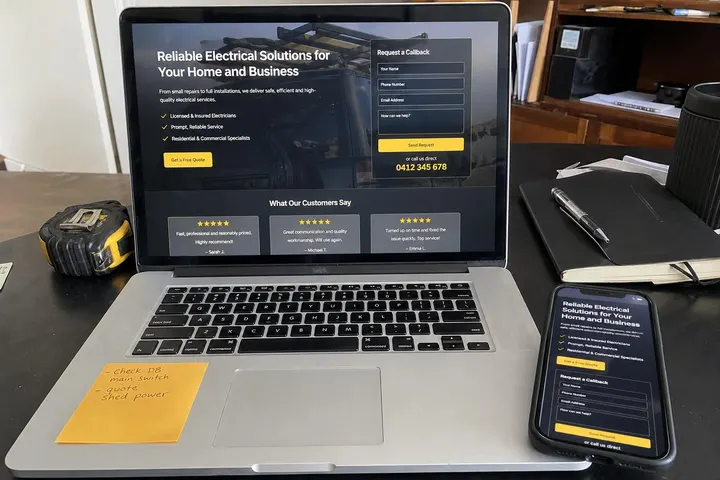
Your phone number must be clickable on mobile, and your enquiry form must not ask for ten fields when three will do. These are the two things that convert casual visitors into actual leads you can follow up on.
Click-to-call: the easiest win most small business websites miss
A click-to-call link looks like a normal phone number, but when someone taps it, their phone dials automatically. This is so simple that it shocks me how many small business websites don't have it. On mobile, click-to-call removes friction. The visitor doesn't have to manually type your number; they tap once and you're getting a call. Most website platforms (WordPress, Wix, Squarespace) make this trivial to set up; it's just a matter of using the right HTML or plugin.
Mobile form design that doesn't send people packing
Long forms on mobile are lead killers. If you ask for name, email, phone, address, job description, preferred time, and ten other fields, half your visitors will abandon the form halfway through. Instead, ask for name, phone number, and a brief description of the work needed. You can ask clarifying questions once they've given you their number and you've called or texted them back.
Forms should also be easy to fill on a phone keyboard. Text fields should use the right input type (email, phone, number) so the phone's keyboard matches the task. Dropdowns are annoying on mobile; use radio buttons or checkboxes when you need to offer a list of options.
We've written in detail about how to get more quote requests from your website, and most of the work is removing friction on mobile.

How to Check If Your Website Is Actually Mobile-Friendly
Testing your own site on your phone is essential, but it's not enough. Your phone's screen size and data connection are just one scenario. You need to test systematically and use data to see how real users experience your site.
Free tools to test your site right now
Google PageSpeed Insights is the gold standard. Plug in your homepage URL and you'll get a mobile score out of 100, plus a breakdown of what's slowing you down. Google Search Console shows you if Google has found mobile usability issues on your site. Google's Core Web Vitals guidance explains what the metrics actually mean and how to interpret them.
What to look for when you browse your own site on a phone
Open your website on your phone as if you're a customer who doesn't know your business. Spend 10 seconds looking at the page. Can you see your phone number or a clear way to get a quote? Can you scroll smoothly without lag? Does the text require pinching to read? Do buttons feel easy to tap? If the answer to any of these is no, your mobile experience needs work.
Test on both iOS and Android if possible, and test on different network speeds (use your phone's developer tools or throttle your connection using Chrome's developer tools on desktop to simulate 4G or 3G).
Squarespace vs Wix vs WordPress: Which Is Best for a Mobile-Friendly Small Business Site?
All three platforms can produce mobile-friendly websites, but they work differently and suit different businesses. Choosing the right platform affects how much control you have over mobile performance and how easy it is to maintain your site.
What each platform does well on mobile
Wix handles mobile responsiveness automatically. You pick a template and Wix adapts it for you. It's the easiest option if you want to launch fast and not think about technical details. The downside is limited customisation and higher long-term costs.
Squarespace produces beautiful, modern websites with excellent mobile design out of the box. If aesthetics and brand consistency matter to you, Squarespace is strong. It's more expensive than Wix but offers better customisation and a more professional feel. Good for service businesses that want to look polished.
WordPress gives you the most control and flexibility. You can optimise every aspect of mobile performance, choose from thousands of plugins, and own your data completely. The tradeoff is that you need to know what you're doing, or hire someone to set it up and maintain it. WordPress powers roughly 43% of all websites globally because it works, but it requires more technical knowledge than Wix or Squarespace.
We've compared Shopify vs WordPress for Australian small businesses in detail, and the same logic applies here: WordPress gives you more control but requires more skill to use well. For a service business or tradie, Squarespace or a professional tradie website design service might be the better choice than managing WordPress yourself.
When to get a custom-built site instead
If you're a high-volume tradie or service business that relies heavily on online leads, or if you need custom integrations (booking systems, payment processing, CRM connections), a custom-built WordPress site or a purpose-built site from an agency might outperform generic templates. The cost of a small business website in Australia varies widely, but you're typically looking at $2,000 to $8,000 for a professionally built site versus $600 to $1,500 per year for Wix or Squarespace.
Common Mobile Website Mistakes That Lose You Leads
Phone number not clickable. Pop-ups that cover the screen and have a tiny close button. Slow load times. Tiny text. Auto-playing audio or video. Overstuffed navigation. Forms with 20 fields. These mistakes are so common that if you avoid them, you're already ahead of most of your competitors.
Also avoid assuming that your mobile site works because it doesn't look obviously broken. Ugly and broken are different things. A site can look okay but still load in seven seconds or have an invisible phone number. Test rigorously and use the data from PageSpeed Insights to guide your decisions.
Conclusion
A mobile-friendly website isn't a feature anymore; it's the baseline expectation. Google ranks mobile-first, your customers search on phones, and if your site isn't built for that reality, you're losing leads. The specifics matter: page speed, clickable phone numbers, single-column layouts, short forms, and large tap targets all work together to convert a phone visitor into an actual call or quote request.
You don't need a fancy website to be mobile-friendly. You need a fast one that makes it easy to call or enquire. Test your site using Google PageSpeed Insights right now, check that your phone number is clickable, and make sure your enquiry form asks for fewer than five fields. If you're using Wix or Squarespace, the mobile-friendly part is already handled for you; just make sure your content is clear and your call-to-action buttons are obvious. If you're on WordPress, spend an afternoon optimising image sizes and removing unnecessary plugins. These aren't sexy changes, but they directly convert browsers into customers.
Start with a speed test today. That's your next concrete step.